Al Quran : Holy Quran Offline
- 4.6
- Rating
- 1.00M
- Installs
- Free
- Price

 Analysis by App-foxy
I approach Quran apps differently from ordinary reading apps. The text is personal, and convenience should never come at the cost of confidence about what I am opening, how I am using it, or what choices I am making on my phone. Al Quran: Holy Quran Offline is a free Android app from genie islam that focuses on a straightforward purpose: giving me access to the Quran for reading without depending entirely on an internet connection, while also supporting online MP3 listening. After spending time with it, I see it as a practical companion for quiet reading, travel, and regular recitation rather than a complete study platform.
Its placement in the Libraries & Demo section makes sense because this is primarily a digital reading and listening tool. The store summary describes an offline Quran experience alongside online audio, and that combination is the central idea I noticed in use. The app does not try to turn the experience into a social network or a broad religious reference library. That narrow focus is useful: I can open it with a clear intention instead of navigating through unrelated material.
How the app earns trust in everyday use
The first reassuring point is that the app is free to install and carries an Everyone content rating. It has reached over 1 million installs and holds a 4.6 average from around 27,000 ratings, which suggests that many people have found the basic concept useful. Those figures do not replace my own judgment, especially with a religious text, but they do show that this is not an obscure experiment with no established audience.
You May Also Like

 Pandora - Music & Podcasts
Pandora’s Music Is Easy to Start, but Harder to Recover
Pandora’s strength is its low-effort path from a seed to a station. Its weak spot is how much confidence it asks you to place in connection, setup, and quiet recovery.

 8 Ball Pool
 Is Built on Rivalries, Rematches, and Routine
A close look at the rivalries, rematches, shared routines, and unanswered safety questions that turn a quick pool match into a persistent mobile community.

 Samsung Music
’s Quiet Strength Is Playing What You Already Own
Its reach comes less from spectacle than from dependable access to a personal library. That simplicity is both the app’s strongest retention engine and its ceiling.

 AccuWeather: Weather Radar
AccuWeather Review: A Quick, Clear Forecast for Everyday Decisions
For everyday plans, the best forecast is the one you can understand quickly. AccuWeather makes rain timing, radar, and local conditions easy to act on, with a few trade-offs.

 Hill Climb Racing
Why Hill Climb Racing Still Turns Crashes Into One More Run
A tiny car, a bumpy hill and one more upgrade: Hill Climb Racing keeps resurfacing because its simple chaos makes every near-miss feel personal.

 AliExpress - Shopping App
AliExpress Makes Global Shopping Feel Personal, but Shoppers Bear the Risk
AliExpress turns a global marketplace into a pocket-sized discovery engine. Its reach is useful, its shopping loop compelling, and its trade-offs easy to miss.
More From Our News Desk
View All News


The developer is listed as genie islam, and the app was released on February 10, 2022. The current version is 1.7.0, with Android 8.0 or later required. That minimum system requirement is helpful for people using an older but still functional Android phone. I would still check the app page on the exact device before installing, particularly if the phone is managed by a family member, school, or workplace and has restrictions on downloads.
One practical trust advantage is the offline reading focus. Once the relevant reading content is available on the device, I can use the app in places where reception is weak or absent. That matters in a mosque with crowded mobile networks, during a flight, on a long road trip, or simply in a room where I prefer to keep the phone disconnected. Audio is treated differently: the store summary specifically presents MP3 Quran listening online, so I would plan for an internet connection when using the listening side rather than assuming every audio session is stored locally.
That distinction is easy to overlook. I would not begin a journey expecting the reading and audio experiences to behave identically. Before leaving home, I would open the app, confirm that the pages I expect to read are accessible, and test the audio only if I know I will have a reliable connection. This small preparation avoids the most common disappointment with apps that combine offline text and online media.
What the controls mean for a careful user
The app’s visible purpose gives me a relatively simple decision path: read when I want an offline session, and listen when online MP3 access suits the moment. I appreciate that this is easier to understand than a crowded app filled with unrelated tools. For a beginner, the limited scope can make the first few sessions less intimidating.
At the same time, I would not confuse a clean purpose with a full set of study controls. Someone looking for extensive commentary, scholarly comparison, advanced search, memorisation analytics, or a detailed translation workspace may find this experience too modest. The store short description is simply “Al Quran,” and the broader description centers on reading and listening. That tells me to judge it as a Quran access app, not as a complete academic suite.
My preferred workflow is to use it for a defined session. I open it before prayer or before going to sleep, choose reading rather than audio when I want a quiet offline routine, and keep the phone’s distractions to a minimum. If I want recitation, I switch to the listening function while connected. Separating those two habits makes the app feel more dependable because I am not asking the online audio feature to solve an offline problem.
Another useful habit is checking the screen before beginning a longer reading session. On a small phone, text presentation can affect comfort more than people expect. If the layout feels cramped or the device is using an unusual display setting, I would rotate the phone or adjust system-level display preferences before settling in. I would rather spend a minute preparing the screen than repeatedly interrupt recitation to reposition the device.
The app includes optional purchases ranging from $1.49 to $15.99 per item. Because the base app is free, I would pay attention to any purchase prompt and decide whether the offered addition is genuinely useful for my routine. A person who only needs basic reading may find no reason to spend anything, while another user may value an optional enhancement. The important point is to treat the purchase screen as a choice, not as part of the basic definition of the app.
Where data sensitivity matters most
Religious reading can be a private activity. I may use the app during a vulnerable period, while learning, or simply because I do not want my habits discussed with anyone else. For that reason, I would review the app’s permission requests and privacy information on the installation page and in Android settings before granting access. I would not approve a permission merely because it appears during setup; I would ask whether it is necessary for the function I intend to use.
The strongest user-controlled boundary is the difference between reading offline and listening online. Offline reading can reduce dependence on a live connection, while online audio naturally involves network activity. I would use that difference deliberately: read offline when I want the quietest and most private routine, and use audio online when the convenience of recitation matters more than keeping the session disconnected.
I also recommend checking notification behavior. A Quran app can be valuable without sending frequent prompts, and I prefer to decide whether reminders belong in my day. Android lets me manage notifications after installation, so I would turn off anything that feels intrusive rather than uninstalling immediately. This is a small example of user agency, but it makes a major difference when the app is meant to support reflection rather than compete for attention.
Storage is another practical consideration. An offline reading app needs some local space, and audio use may involve network activity or temporary files depending on how the app handles playback. I would inspect the app’s storage use in Android settings after a few sessions, especially on a phone with limited capacity. If storage grows unexpectedly, clearing temporary material or reviewing the app’s available controls is more sensible than assuming the phone itself is malfunctioning.
I would also avoid entering personal information unless the app clearly requires it for a function I actually want. A focused reading tool should be approached with restraint: install it, examine the visible choices, deny unrelated access, and remove it if the controls do not match my comfort level. This is not a criticism unique to this app; it is a sensible routine for any application handling a subject that can reveal personal beliefs or habits.
Real situations where it fits well
My favorite use case is a short offline reading session during a commute. I can open the app before leaving, put the phone on silent, and read without depending on a stable signal. If the journey passes through tunnels or rural areas, the reading experience is less likely to be interrupted than a browser-based alternative. I would use headphones only when I deliberately switch to online recitation, keeping the two modes separate.
It also suits a student or new reader who wants a simple starting point. The free entry point removes an immediate price barrier, and the Everyone rating makes it appropriate for a broad household audience. A parent could introduce the app as a reading tool while still reviewing notifications, permissions, and purchase prompts together with the child. That shared setup is better than assuming the default configuration will suit every family.
For someone who frequently travels, the offline emphasis is more meaningful than a polished home-screen design. A web page may be fine at home but unreliable on a plane, in a basement, or in a crowded venue. I would prepare the app while connected, then rely on the reading mode during the trip. The trade-off is that online MP3 listening remains tied to connectivity, so a traveler who wants uninterrupted audio should consider a different solution with clearly documented local playback.
The app can also work as a backup. I would not necessarily replace a printed Quran or a more advanced study application, but I would keep this kind of focused tool available for moments when carrying a book is inconvenient. A backup is valuable when it is quick to open and does not demand a complicated account or learning process. The less setup I need, the more likely I am to use it during a spare five-minute break.
Who may prefer another option
I would hesitate to recommend this app as the only choice for a reader who needs deep interpretation, multiple translations, verse-by-verse notes, or structured memorisation plans. Those needs call for a specialist study app or a trusted printed resource. Reading and listening are important foundations, but they are not the same as guided scholarship or a personal learning system.
It may also be a poor fit for a person who expects all audio to work offline. The app’s summary distinguishes offline reading from online MP3 listening, so I would choose another tool if downloaded recitation is essential for every journey. Likewise, someone who wants a completely distraction-free device may prefer a dedicated e-reader or printed copy, even though this app is convenient.
Users who are highly sensitive to purchases should inspect the interface carefully. The app is free, but optional items are available across a stated range of prices. I would not treat that as a problem by itself; many free apps use optional purchases. Still, if I were setting up the app for a child or an older relative, I would review Google Play purchase authentication and device-level controls first.
There is also a personal preference issue. Some readers want a very minimal tool with no audio at all, while others want a rich dashboard of bookmarks, goals, and progress. This app’s appeal is strongest in the middle: it offers a direct route to reading and online listening without presenting itself as a full learning environment. If that balance sounds right, it is worth trying. If not, a more specialised alternative will probably feel less restrictive.
My final assessment after testing the routine
I see Al Quran: Holy Quran Offline as a useful, focused Android app for people who value accessible Quran reading and want an offline option. Its free price, broad age rating, established audience, and modest system requirement make it easy to consider. The most important practical lesson is to treat reading and audio as two different experiences: offline reading is the dependable core, while MP3 listening is designed around being online.
My recommendation comes with a careful setup rather than blind approval. I would review permissions, privacy choices, notifications, storage, and purchase controls immediately after installation. I would then test an offline reading session before relying on it away from home. Those steps give me a clearer sense of control and prevent the app from becoming more connected or distracting than I want.
The app is at its best when I use it intentionally: offline for quiet reading, online for recitation, and with every visible permission or purchase choice reviewed on my terms. For a simple Quran companion, that is a sensible balance. For advanced study, downloaded audio, or detailed personal tracking, I would look elsewhere. Within its narrower purpose, however, genie islam has created a practical option that can fit naturally into daily reading without demanding a complicated routine.
FAQs for Al Quran : Holy Quran Offline
01Is the Al Quran: Holy Quran Offline app truly offline?
Yes, the Al Quran: Holy Quran Offline app is designed for full offline use. Once downloaded, all the Quranic texts and features are accessible without an internet connection, making it convenient for users who wish to read or listen to the Quran anywhere without worrying about data usage.
02What features does the Al Quran: Holy Quran Offline app offer?
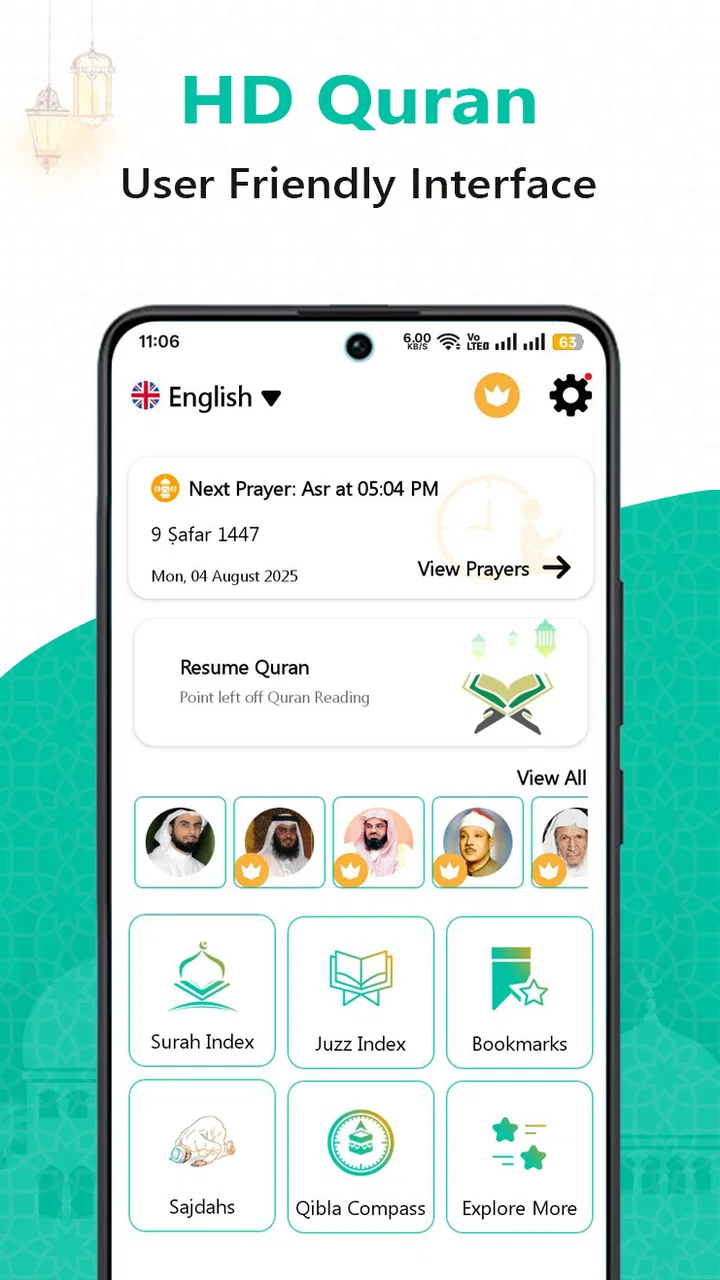
The app includes features such as multiple translations, audio recitations, and a search function for specific verses. It also offers bookmarks and a user-friendly interface that allows easy navigation through different chapters and verses, ensuring an enriching experience for both casual readers and serious students of the Quran.
03Are there any in-app purchases or ads in the Al Quran: Holy Quran Offline app?
Generally, the app is free with optional in-app purchases for additional features such as premium audio recitations or ad removal. While the core functionalities remain accessible at no cost, users can enhance their experience with these paid options. Ads are minimal and do not disrupt the reading experience.
04How can I ensure the translations are accurate in the Al Quran: Holy Quran Offline app?
The app provides translations from reputable scholars and sources. Users can compare multiple translations to gain a better understanding of the verses. It's recommended to cross-reference with other trusted resources if accuracy is a concern, ensuring a comprehensive understanding of the Quranic text.
05Does the Al Quran: Holy Quran Offline app support different languages?
Yes, the app supports multiple languages for translations, catering to a diverse user base. Users can select their preferred language from the settings, allowing them to read the Quran in a language they are comfortable with while maintaining the integrity of the original Arabic text.
Pros
- No internet needed for full access
- User-friendly interface for easy navigation
- Includes translations in multiple languages
- Audio recitations available for all Surahs
- Bookmark feature for quick reference
Cons
- Limited customization of font size
- Ads may disrupt reading experience
- Audio requires additional space
- No night mode for low-light reading
- Frequent updates can consume data

Al Quran : Holy Quran Offline
Gallery